 LiveGrid
Watch F1 Channel — Replays, Highlights & Motorsport TV
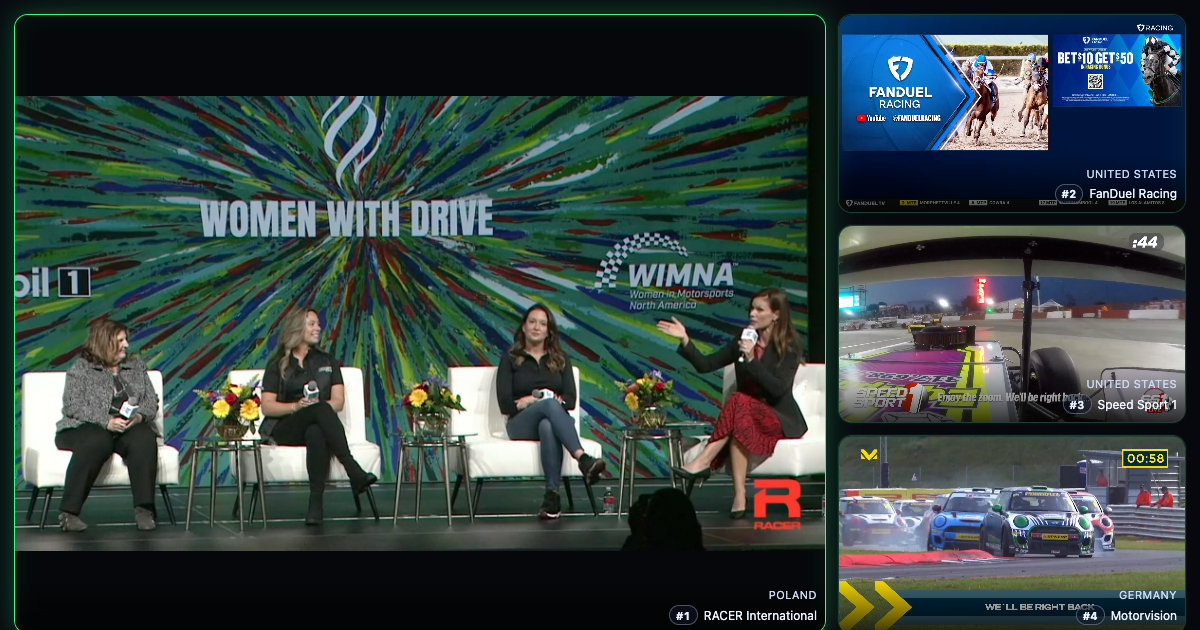
Monitor 4 motorsport channels simultaneously — RACER International, F1 Channel US, Speed Sport 1, and Sky Sport F1. Follow F1 Channel coverage, racing analysis, features, and wider automotive programming on one screen. No login, no install.
Watch Motorsport TV NowConsider Surfshark for a more private, travel-friendly viewing setup when streaming from overseas or public Wi-Fi.
Affiliate disclosure: LiveGrid may earn a commission at no extra cost to you.
Why LiveGrid for F1 Channel and Motorsport Coverage?
F1 Coverage Without Tab-Hopping
Keep RACER International front and center while monitoring F1 Channel US, Speed Sport 1, and Sky Sport F1 alongside it. When a race weekend is active, you can track F1 Channel style programming, highlights, interviews, and broader motorsport coverage on one wall instead of bouncing across separate streaming apps and sports sites.
Main + 3 Motorsport Layout
Use the hero layout to keep one main racing feed with audio while three secondary channels stay visible for context. It is a practical setup for race-weekend monitoring, replay watching, and keeping one eye on other series while Formula 1 coverage rolls.
Fast, Free Browser Access
No login, cable box, or install flow. Click once and your motorsport wall opens immediately in the browser with four racing channels ready to stream. It is designed for fans who want instant access to F1 Channel viewing and adjacent racing coverage without friction.
Featured Channels
RACER International FAST
RACER International is the anchor for this wall. It is well suited for motorsport highlights, analysis, interviews, and shoulder programming that fits around Formula 1 weekends, giving F1 Channel fans a dependable main feed.
F1 Channel US & Speed Sport 1
These two channels keep the wall closer to live racing culture. F1 Channel US and Speed Sport 1 add race-day coverage, news, features, and motorsport storytelling that help fill the gaps between F1 sessions and race weekends.
Sky Sport F1
Sky Sport F1 rounds out the wall with dedicated Formula 1 programming from one of the sport's most comprehensive broadcasters, adding race coverage and analysis so the setup stays useful across the entire F1 calendar.
How It Works
Open the Preset
Hit "Watch Motorsport TV Now" to launch LiveGrid with RACER International as the main stream and three additional motorsport channels already loaded. Your F1 Channel wall is ready immediately.
Track F1 and Motorsport Together
Watch all four channels at once. Keep audio on the main racing feed for highlights or analysis, then switch focus to another tile whenever a different channel becomes more relevant.
Return for the Next Race Weekend
Your layout saves automatically in the browser, so the same motorsport wall is ready when the next Formula 1 weekend, replay window, or support-series session comes around.
Why This F1 Channel Setup Works
Built for the Current F1 Season Rhythm
During a Formula 1 season, interest spikes around every Grand Prix weekend, but fans also spend time on previews, analysis, highlights, post-race breakdowns, and archive viewing between live sessions. This setup fits that rhythm by centering a dependable motorsport feed while surrounding it with broader racing and automotive channels that complement F1 Channel viewing.
Clear Positioning for Fans
This page is intentionally tuned to F1 Channel oriented motorsport coverage rather than promising every live Grand Prix broadcast. That makes the experience honest and useful: viewers land on a page that matches the channels actually available in the product today.
Who Uses This
Formula 1 fans following each race weekend, motorsport viewers who want analysis and replay coverage between sessions, racing-content creators monitoring adjacent channels, and anyone who wants a clean browser-based F1 watchlist without extra setup.
Tips for Following Motorsport on LiveGrid
Use It Around Grand Prix Weekends
The most useful rhythm is to open this wall before and after each Formula 1 weekend. Keep RACER International on the main tile for recap content and use the side feeds to maintain awareness of wider motorsport programming while you wait for the next session window. That makes F1 Channel monitoring more practical week to week.
Switch Audio for Interviews and Analysis
Not every channel will matter equally at the same moment. Leave the wall running visually, then click into whichever tile is carrying the most relevant analysis, feature segment, or replay package when something worth hearing comes on.
Keep One Persistent Motorsport Setup
Because LiveGrid saves state automatically, you can treat this page as your standing motorsport dashboard. Come back on the next race week and the same F1-focused wall is already in place.
Travel-friendly setup
Watching from abroad?
Consider Surfshark for a more private, travel-friendly viewing setup when streaming from overseas or public Wi-Fi.
Affiliate disclosure: LiveGrid may earn a commission at no extra cost to you.
Related Live Coverage
Sports TV Live
Explore the broader sports wall for golf, soccer, and college sports channels when you want coverage beyond motorsport.
USA News Live
Pair sports monitoring with American news coverage during major race weekends, business announcements, or driver-market storylines.